In this guide, you’ll learn what a Unified Namespace actually is in practical terms, why manufacturing plants are moving to this architecture now, and how to implement one without shutting down production or replacing the systems you already have. We’ll walk through a proven 5-step implementation framework, the most common challenges plants run into and how to solve them, and where analytics tools like dataPARC fit into the architecture to make your namespace data actionable.
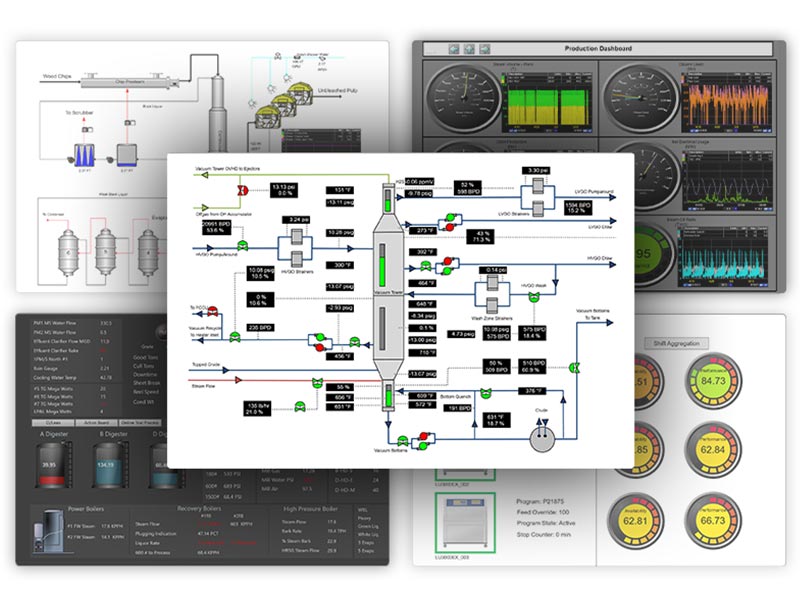
Break Data Silos and Gain Real-Time Visibility Across Your Enterprise with PARCview
Today it seems most manufacturing plants don’t have a data problem; they have a data access problem.
The data exists. PLCs are logging every cycle. Historians are storing years of process data. MES systems are tracking orders, ERP systems are managing inventory and costs. And lab systems are recording quality results. The problem is that none of these systems talk to each other in any meaningful, real-time way. An operator on the floor can’t see what the ERP knows. A process engineer can’t correlate quality lab results with what happened upstream an hour ago. An executive dashboard is pulling from a report that was generated last night.
The result is decisions made on incomplete information, inefficiencies are invisible until they become expensive, and AI or analytics initiatives that stall out because the data foundation isn’t there.
A Unified Namespace is the architectural answer to that problem.
What is a Unified Namespace & Why Manufacturing Plants are Moving to one.
A Unified Namespace (UNS) is a single, real-time data environment where every system in your operation; from plant floor equipment to enterprise business systems can both publish and consume data through one central hub.
Instead of building direct connections between every system (which grows into an unmanageable web of integrations over time), a UNS puts a central broker in the middle. Every system sends its data to one place, and every system that needs that data pulls from that same place. Add a new system and it connects to the hub, not to every other system individually.
Data is organized using a standard hierarchy that mirrors your actual operation: enterprise, site, area, line, cell. This means a quality alert from Line 3 at your one facility is labeled and findable as exactly that, not buried in a tag name that only the engineer who built the system in 2011 understands.
For a deeper dive into UNS concepts and architecture, Unified Namespace Explained.
So, Why Are Plants Moving to This Now?
Plants have started moving toward UNS systems or UNS-like systems because of their many benefits and ease of maintenance. Along with growing pressure with AI and analytics.
AI and analytics initiatives are exposing the data foundation problem.
Plants are investing in machine learning models, predictive maintenance, and real-time optimization tools, and discovering that the data those tools need is scattered, inconsistently formatted, and hard to access at scale. You can’t build an AI-ready operation on a spaghetti architecture. A UNS creates the clean, contextualized, accessible data layer that those initiatives actually require. It readies your manufacturing ecosystem for AI and analytics.
Point-to-point integrations have hit a breaking point.
Most plants have spent years building direct connections between systems as needs arose. Historian to MES here, SCADA to ERP there. What started as a practical solution becomes a maintenance burden. Every new system means new integrations. Every change to one system risks breaking connections downstream. A UNS replaces that sprawl with a single, scalable architecture for all your data integration needs.
IT and OT teams are finally being asked to work together.
Digital transformation initiatives are pushing operational technology and information technology closer than they’ve ever been. The problem is they’ve historically run on different protocols, different data models, and different priorities. A UNS provides a common data environment that both sides can work from without either team having to abandon the systems they already rely on.
The cost of doing nothing is becoming visible.
Slow decisions, missed quality events, energy inefficiencies, and stalled improvement projects all have a common root cause: the right data didn’t reach the right person at the right time. Leadership teams are starting to put a number on that cost, and the connected plant conversation follows quickly.
Thinking about an Industrial Data Platform? Let our Smart Factory guide your way.
The 5-Step Framework for Implementing a Unified Namespace in Manufacturing
Implementing an UNS isn’t a single project with a defined end date. It’s an architectural shift that happens in stages. The plants that do it successfully don’t try to connect everything at once, they start with a clear framework and build from there. Here’s how to approach it.
Step 1: Audit Your Data Sources
Before touching any software, you need a clear picture of what data exists, where it lives, and who needs it.
Walk through every system generating data in your operation: PLCs, SCADA, historians, MES, ERP, lab systems, energy meters, quality systems. For each one, ask three questions: What data is it producing? Who currently has access to it? Who should have access to it but doesn’t?
This audit almost always surfaces surprises. Quality data that operators need in real time, but only see in a morning report. Energy consumption data that exists but has never been connected to production output. Historian tags that haven’t been mapped to anything meaningful in years.
The audit isn’t just a technical inventory; it’s a business case. The gaps you find are the gaps your new architecture will close, and they’re the ones worth building around first.
Step 2: Define Your Namespace Hierarchy
This is the step most plants underinvest in, and it’s the one that determines whether your UNS is sustainable long-term.
A namespace hierarchy is the naming structure that organizes all your data, typically following the ISA-95 standard: enterprise → site → area → line → tag. Before you connect a single system, map this structure to your actual operation. What are your sites? How are your production areas organized? How do your lines break down into equipment?
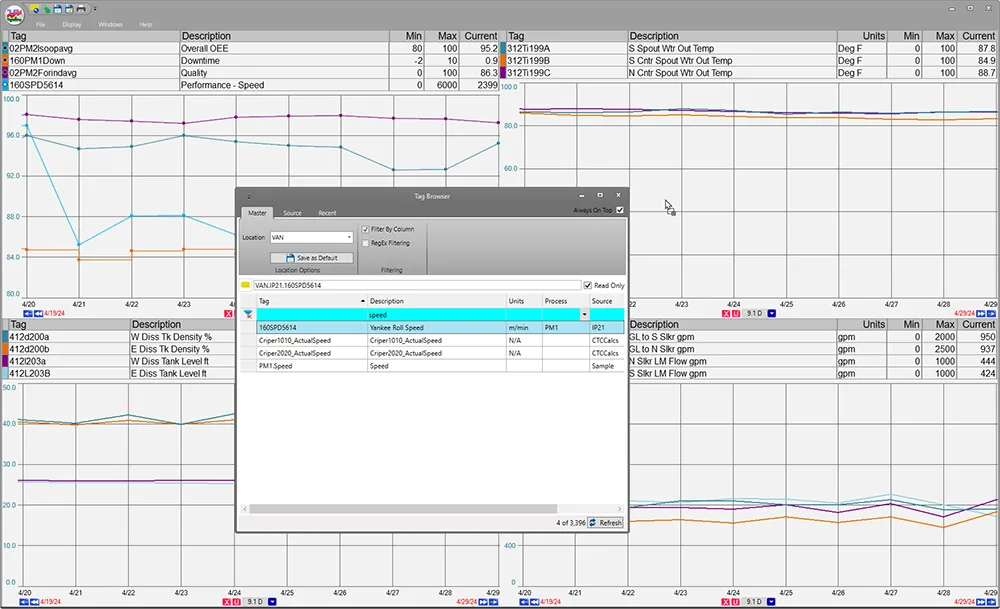
The namespace hierarchy will be what users use to search tag names. The more intuiative the faster they will be able to find tags for troubleshooting and analysis.
Get this right, and every piece of data in your namespace is instantly findable, contextually meaningful, and consistent across your entire operation. Get it wrong, and you’ve rebuilt the same tag-naming chaos you were trying to escape, just in a new system.
This step requires IT and OT to be in the same room. OT knows how the plant is actually structured. IT knows how the data needs to be organized for enterprise consumption. Neither side should define the hierarchy alone.
Step 3: Choose Your Infrastructure
The broker is the central hub that all your systems will publish data to. There are several strong options available. Your choice will depend on your existing infrastructure, your IT team’s familiarity, and the scale of your operation.
A few things to evaluate when selecting:
- Scalability: Can it handle your tag volume as you add systems over time?
- Security: Does it support the access controls and encryption your IT and compliance teams require?
- Protocol support: Can it connect to the OT systems you already have, not just greenfield equipment?
- Support and community: Is this a tool your team can get help with when implementation gets complex?
Step 4: Connect Your Data Producers
With your hierarchy defined and your software in place, it’s time to start connecting systems.
Prioritize connections based on business value, not technical ease. Ask: where is the cost of disconnected data highest right now? That’s where you begin. Common starting points include:
- Production data from PLCs and SCADA — the real-time heartbeat of your operation
- Quality and lab systems — data that needs to reach operators and engineers faster than it currently does
- Historian data — contextualizing live data with historical trends
- MES and ERP — connecting operational execution with business planning
For modern equipment, connections are relatively straightforward using standard industrial protocols. For legacy systems, and most plants have plenty of them, edge gateways and protocol converters can bridge the gap without requiring equipment replacement. This is where tools like dataPARC add significant value, connecting older systems and disparate data sources into the namespace without forcing a rip-and-replace approach.
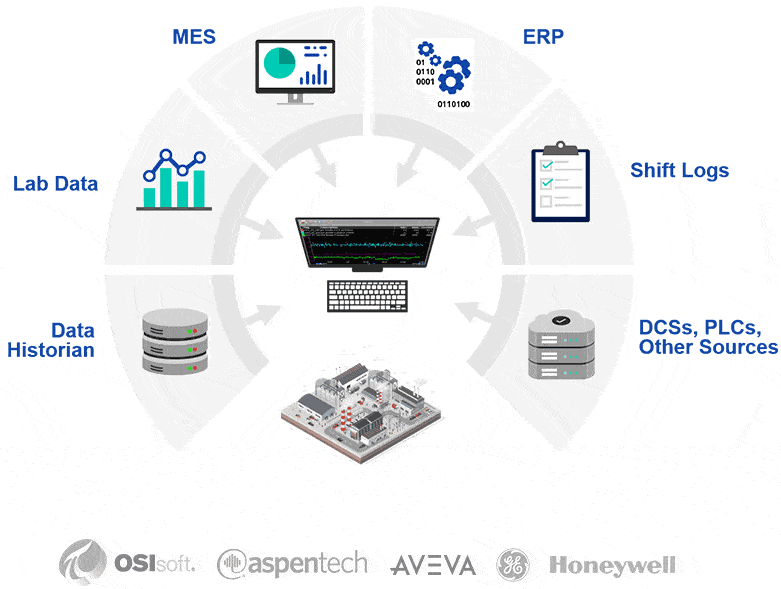
Manufacturing data integration platforms with dataPARC help pull all the sources together into a single source of truth, giving users seamless access to the information they need.
Step 5: Layer In Analytics, Visualization, and Context
This is the step that turns a UNS from an infrastructure project into a business outcome.
Raw data flowing through a namespace is necessary but not sufficient. An operator can’t act on a stream of numbers. An engineer can’t optimize a process from a list of tag values. The data needs context, production run boundaries, quality specifications, event histories, operator logs. It needs to be presented in a way that drives decisions.
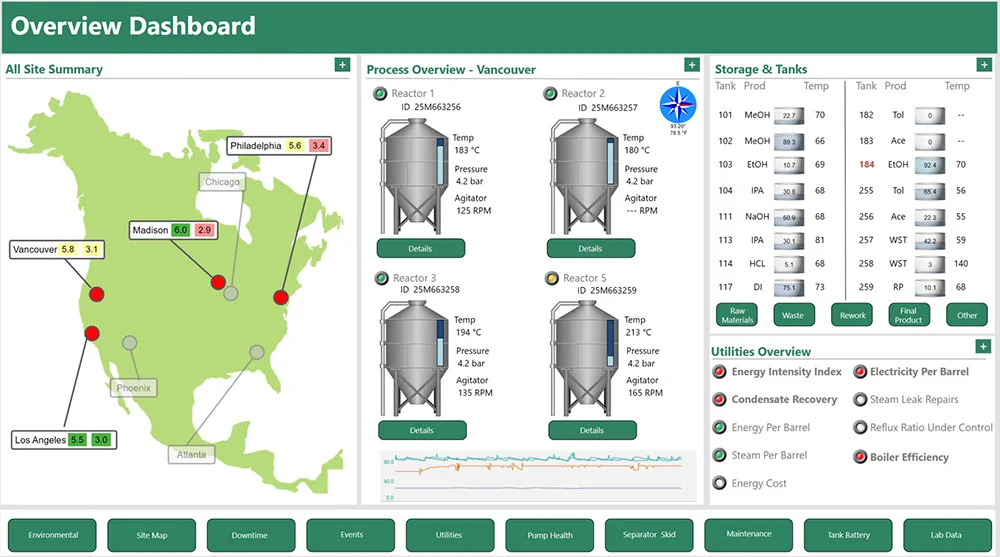
Visualizations like dashboards help engineers, operators, and supervisors view data at a glance, allowing them to see the important details for their role.
This is where the analytics and visualization layer sits. dataPARC adds that context, aligning process data with lab results, production records, downtime events, and quality history into a unified operational view. Engineers can analyze trends across systems that were previously siloed. Operators get real-time visibility into the metrics that matter for their specific role. Supervisors can monitor KPIs across lines and shifts without waiting for a report.
This layer is also what makes AI and machine learning initiatives viable. Models need clean, contextualized, consistently structured data to train on and operate against. Integrated systems provide the architecture. An analytics platform like dataPARC provides the structure and context that makes that data usable for advanced applications.
Common Implementation Challenges
Not all implementations can go one without a hiccup or two. The plants that succeed aren’t the ones that avoid problems, they’re the ones that anticipate them. Here are the most common obstacles and how to work through them.
“We can’t take our systems offline to reconnect them.”
This is the most common concern, and it’s a legitimate one. Production can’t stop for an architecture project.
The solution is an incremental approach. Many software don’t require a cutover, it can run alongside your existing systems while connections are built one at a time. Start with a system that has lower operational risk, prove the connection, then expand. Most plants run their existing integrations in parallel during the transition and phase them out gradually. You’re building a new highway alongside the old roads, not tearing up the roads while people are still driving on them.
“Our OT team and IT team can’t agree on the data hierarchy.”
This is less a technical problem and more a governance problem, and it’s surprisingly common.
OT teams think in terms of equipment and process areas. IT teams think in terms of data structures and enterprise systems. Both perspectives are correct, and both are needed. The fix is to establish a cross-functional working group before any technical work begins, with a clear mandate to define the hierarchy together. Bring in a neutral facilitator if needed. The ISA-95 standard gives you a framework to work from so the conversation isn’t starting from scratch. Time spent on alignment here saves months of rework later.
“We implemented our new system, but nobody is using the data.”
This happens more than most vendors will admit. The system is running, data is flowing, and adoption is flat.
The root cause is almost always the same: the data is accessible in a technical sense but not useful in a practical one. Raw tag streams don’t drive decisions. This is why the analytics and visualization layer isn’t optional, it’s what closes the gap between data existing and data being used. If your team can’t see the data in a meaningful context, the UNS delivers infrastructure value but not operational value. Prioritize the tools that turn namespace data into dashboards, trends, and alerts that operators and engineers actually reach for.
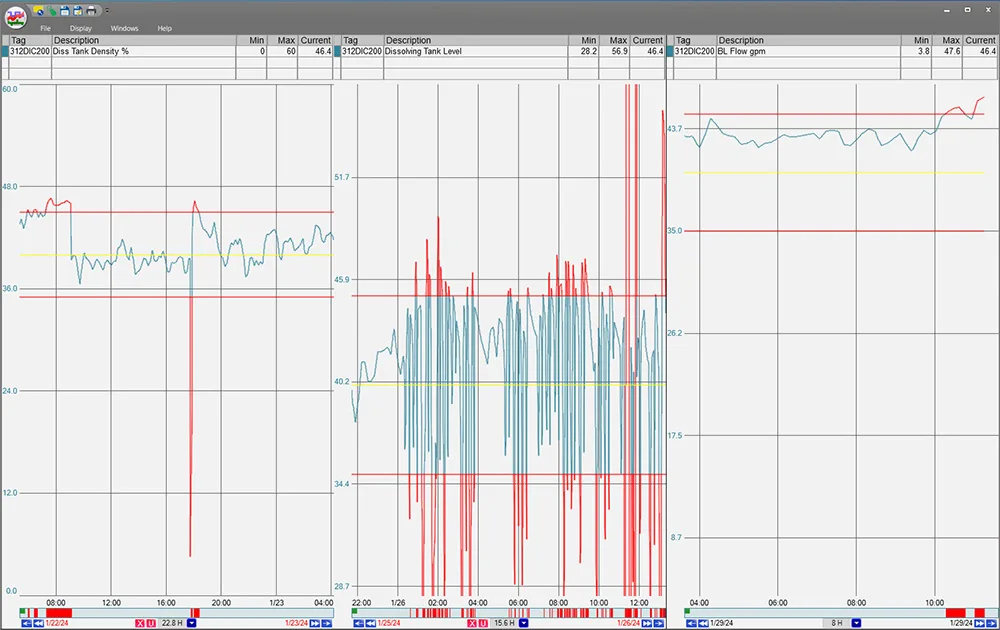
Pulling limits into the system adds another layer of context that operators can interact with. They can visually see limits, and alerts can be sent when a value goes out of spec. Operators can also acknowledge alerts, allowing them to keep track as to WHY something is out of spec.
“We don’t know where to start.”
Start with one problem, not one system.
Identify the highest-value data gap in your operation right now, the place where the right information reaching the right person would have the most measurable impact. Work with your systems implementation group to determine the first connection and what visualization features could be helpful.
How dataPARC Enables UNS in Practice
For most manufacturing teams, the goal isn’t a well-connected data architecture, it’s faster decisions, fewer quality escapes, better visibility into what’s happening on the floor, and the ability to catch problems before they become shutdowns. dataPARC is where these outcomes happen.
Here’s what that looks like in practice:
Connecting what you already have.
dataPARC integrates with SCADA, DCS, historians, MES, ERP, lab systems, and cloud platforms through OPC, SQL, REST, and cloud interfaces. For plants building toward a UNS, this means existing systems can be brought into a unified data environment incrementally, without waiting for a full architectural overhaul to start seeing value.
Adding context to raw data.
Data flowing through a namespace is just values and timestamps until it’s given meaning. dataPARC aligns process data with production run boundaries, lab results, operator comments, downtime events, and quality history, turning raw streams into a structured operational model that engineers and operators can actually work with.
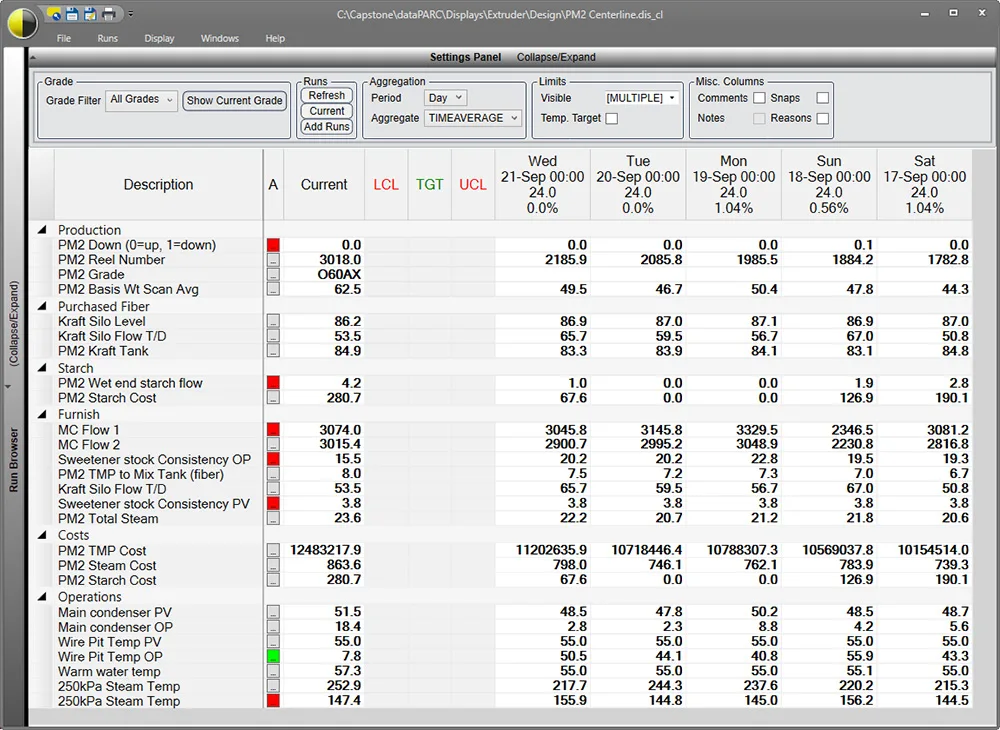
This centerline display is unique to PARCview. It is a tabular report organizing data by runs, or time periods for fast analysis and comparison. Both lab and process data is on the same screen.
Making data actionable at every level.
Operators get real-time visibility into process conditions. Engineers get trend analysis and anomaly detection across systems that were previously siloed. Supervisors get KPI monitoring across lines and shifts. Executives get the operational picture they need without waiting for a morning report. Each role gets what it needs from the same underlying data.
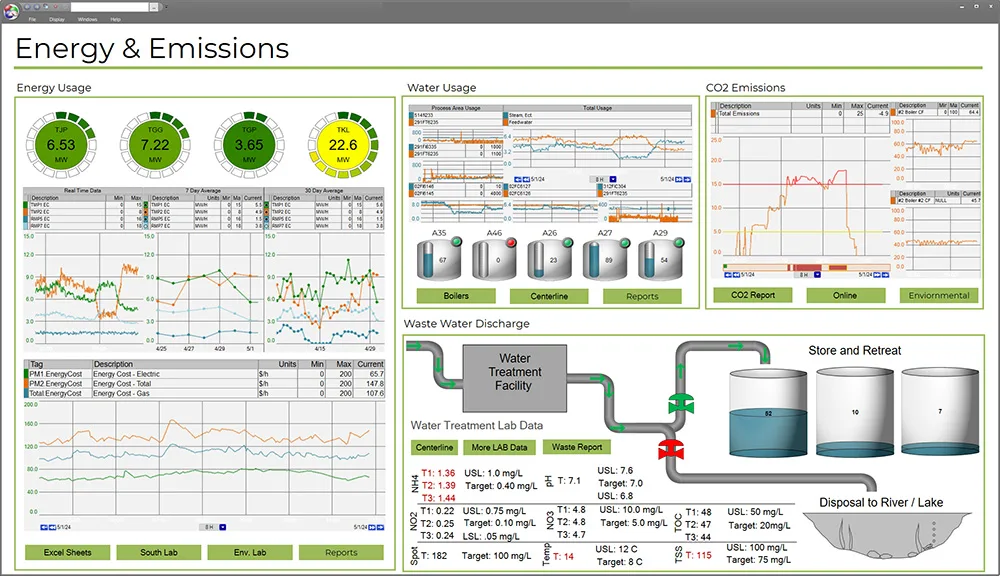
This dashboard is an example of how process data and lab data can appear on a single dashboard for a specific user. Summarizing the key data they need.
Enabling AI and advanced analytics.
Clean, contextualized, consistently structured data is the prerequisite for any serious AI or machine learning initiative. dataPARC structures namespace data into an analytics-ready model, eliminating the inconsistent formats, naming differences, and timing gaps that typically derail model development. When models are ready, outputs flow back into the plant environment in real time.
Supporting gradual adoption.
Unlike rigid UNS implementations that demand a complete infrastructure overhaul up front, dataPARC works with the systems already in place. Plants can build toward a full UNS architecture at their own pace, with dataPARC delivering value at every stage of the journey, not just at the finish line.
Conclusion
A Unified Namespace in manufacturing is an architectural decision you make about how your operation handles data, and it compounds over time. The plants building this infrastructure now are the ones that will have AI-ready data, real-time operational visibility, and the ability to scale analytics initiatives without rebuilding their foundation every time.
The implementation doesn’t have to happen all at once. Start with the audit. Define the hierarchy before touching any software. Connect your highest-value data sources first. And make sure the analytics layer is part of the plan from the beginning. Data that flows but can’t be acted on doesn’t deliver the outcomes the architecture promises.
dataPARC is built for exactly this environment. Whether you’re at the beginning of your UNS journey or looking to get more value from an architecture already in place, dataPARC bridges the gap between raw operational data and the decisions that drive real improvement.
Ready to see how dataPARC fits into your architecture? Request a Demo
Frequently Asked Questions
- What is a Unified Namespace in manufacturing?
A Unified Namespace is a centralized, real-time data architecture where every system in a manufacturing operation, from plant floor equipment to enterprise business systems. It replaces the tangled web of point-to-point integrations with a single, scalable data environment organized around a standard hierarchy that mirrors the operation itself. - How is a UNS different from SCADA or a data historian?
SCADA systems monitor and control equipment at the process level. Historians store time-series data for long-term analysis. A UNS is an architectural layer that sits above both, connecting them, along with MES, ERP, lab systems, and other platforms, into a single accessible data environment. A UNS doesn’t replace your historian or SCADA; it makes their data available across the entire operation in real time. - Can I implement a UNS without replacing my existing systems?
Yes, and this is one of the most important things to understand about UNS architecture. The goal is to connect existing systems, not replace them. Edge gateways handle legacy equipment. Tools like dataPARC bridge older historians and SCADA systems into a modern data environment. Your existing infrastructure becomes part of the UNS, not an obstacle to it. - What is ISA-95 and why does it matter for UNS?
ISA-95 is an international standard that defines how enterprise and control systems should exchange information. In UNS implementations, it provides the framework for organizing your namespace hierarchy. Using ISA-95 as your structure ensures your data is organized in a way that’s consistent, scalable, and recognizable across teams and systems. - Where does dataPARC fit in an UNS architecture?
dataPARC serves as the analytics and visualization layer within a UNS architecture. It connects to your namespace environment and adds the context, analysis, and real-time visibility that turns raw data into operational decisions. It also bridges existing systems, historians, SCADA, MES, ERP, lab systems into a UNS environment without requiring those systems to be replaced, making it a practical entry point for plants building toward a full UNS architecture. - How do I start building a UNS if I already have a historian?
Your historian is an asset, not an obstacle. Start by auditing what data your historian holds and who currently has access to it versus who needs it. Then define your namespace hierarchy and identify which data sources to connect first based on business value. dataPARC can connect your existing historian data into a broader UNS environment, so you’re building on what you have rather than starting over.
Building The Smart Factory
A Guide to Technology and Software in Manufacturing for a Data-Drive Plant